If you use Firefox, there's a big chance you've installed extensions. There are some extensions that change your browsing habits, so you'd like to have them with you at work, on your new computer or on just about any computer you use.
There's an easy way to backup your Firefox extensions: Firefox Extension Backup Extension. I know it has a funny name, so you can just call it FEBE. You can backup your extensions, your themes, your bookmarks and settings to a folder. Copy that folder to a CD, send it by email in an archive or just put it on an USB flash drive. 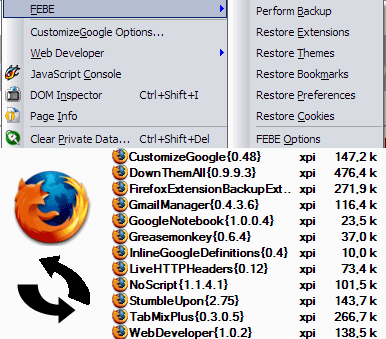
How to restore extensions?
* Open Tools/Extensions from the menu
* Drag and drop the extensions from the backup folder to the extension dialog.
You can also restore extensions one by one from Tools/FEBE/Restore Extensions.
But what about the settings for each extension? If you backup your Firefox settings, you'll also have them.
Backup FF extension on the move
Subscribe to:
Post Comments (Atom)
1 comments:
Oh yeah....I only rely on Firefoxy and extensions play a major role...
Thanks for this post on how to restore extensions...that was kewl
Got refrence of this blog from Rini :)
Greetz!!
Post a Comment